1.2.3 - The Risks You're Avoiding Naming Are the Ones That Bite You
Name the named risk: say what might fail, who or what it would affect and what action will reduce the damage.

The earlier files describe what we want to happen: who the user is, what pain we are solving, what we promise, how we explain it, what success looks like. risks.md names what could go wrong on the way: the specific failures worth preparing for now. The earlier files are the plan; risks.md is the audit of where the plan can break.
Named risk
Are the key risks named before they hit users?
The call
Name the risks early. Otherwise AI helps you move faster toward a failure you have not prepared for.
Sharpen the named risk with AI
This is a Shape idea, so the AI move is to Sharpen the named risk: run your draft through the prompt below until two people would make the same decision from it. Build and Launch ideas have their own AI moves, building and running the code.
New here? Let your AI do this with you. Paste your problem into Guide me and it builds a prompt that walks you through this in ChatGPT or Claude. You do not need to know how to prompt.
Prefer to drive the AI yourself? Give ChatGPT or Claude this page and ask it to help. For skill.txt, the Claude Code plugin and other ways in, see how to use vibe2value.
Or copy this prompt into AI chat, replace the bracketed lines with your real named risk and keep the instruction exactly as visible here. It helps you put your risks.md together by refining your three lines until two people would make the same product decision from them.
The risks you are avoiding are the ones you will never volunteer, so this wants a prompt that interrogates rather than one that answers. That is Interview me, one of the ways to get to a sharp answer.
The same idea on a recipe card
Picture cooking for guests and thinking ahead to what could ruin it. "If there is not enough food it hits the last two guests, who go without, so count the plates the day before" names the failure, who it hits and what you would do about it. "It will probably be fine" names nothing, so you only find out when the serving dish reaches the last two plates empty.
Your named risks are that bit of thinking ahead. For each one say what could go wrong, who or what it would hit and what you would do about it. Name them while there is still time to buy more, not once the guests are already eating.

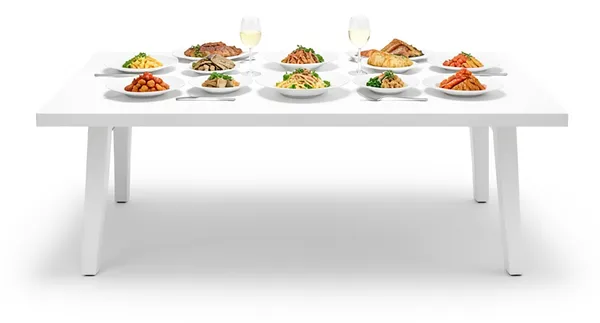
If there is not enough food it hits the last two guests, who go without, so count the plates the day before.
- ✓what might failthere is not enough food
- ✓who it affectsthe last two guests, who go without
- ✓what reduces the damagecount the plates the day before
The recipe card is just a simple example, using everyday cooking ideas everyone understands, to make the concept clear.
What it really means
A named risk is not general caution. It is a specific failure that could happen, who it would affect and what would make it visible. Until you can say what could fail, where it would show up and how you would respond, the plan is too soft. AI can help surface options, but it cannot own risk judgement.
Make the named risk concrete
Compare the broad version with a version you can actually test.
- Too vague: There are some risks around privacy.
- Concrete enough to test: A digest quotes one person's log to another. Everyone who trusted it with private thinking is affected, so each sender gets their own log and replies only ever go back to the address they came from.
The second version lets two people prepare for the same failure from it.
Check the named risk
- Pass: You can say what might fail, who or what it would affect and what action will reduce the damage.
- Fail: If the risk still sounds like a vague concern instead of a concrete failure, it is not named well enough yet.
Do not move into build, launch or rollout work until this passes.
What you'll walk away with
You put this into practice with the prompt above. You'll come out with named risks clear enough that every later decision flows from them. Mitigations, scope cuts, what you defensively avoid and the prompts you write to AI all inherit that clarity.
You write each risk in advance so the team has a shared map of where version one could break, not a list assembled in the post-mortem. The file is called risks.md (plural) because over time you accumulate several named risks in one file as you discover them. The post calls each entry a "named risk" because the unit of work is one risk at a time, written in the same three-line shape so the file stays scannable.
Write it down
Your risks.md is a real file in your project. The AI forgets everything between sessions. It reads this file each time to pick up what you already decided, on this idea or another part of the build. Write it down once instead of explaining it again.
knowledge-base/framework/shape/risks.md is just a suggested name and place for this information. The name and the location are just how we organise this type of documentation, not something you have to follow. Call the file and put it wherever suits your project. What matters is that it is written down in a format that is easily understood by both people and the AI.
The .md ending is markdown, a plain text format often used for documents kept in a code repository like GitHub. It is just the common way people store this kind of writing alongside their code.
Writing it down is how you keep good context for your AI. See Keep the signal, not the noise for why this matters across a whole build.
Risk and mitigation
- Risk: Allowing unnamed risks to survive planning, which leads to weak decisions and rushed fixes after users are affected.
- Mitigation:��Require one named risk, one assumption and one user-impact statement before each major build decision.
Key takeaway
Do not move forward until you can say what might fail, who or what it would affect and what action will reduce the damage.
How to document your named risk
Write your named risk up in full so your AI has the whole picture: the answer, why you believe it, what you are optimising for, where you might be wrong and the standing instruction it should follow. Keep it in a file with your project like this.
# Named risk

## Answer
Likely failure: [what might fail]
Affected user or workflow: [who or what it would affect]
Mitigation: [what action reduces the damage]

## Evidence
Why you believe this. Conversations, examples, tickets, your own experience.

## Decision
What you are optimising for and what you are saying no to.

## Risk
Where you might be wrong and what would tell you.

## AI instruction
The standing note your AI reads on this project.
Here is one filled in so you can see what good looks like, grounded in the recipe card idea from earlier.
## Answer
Likely failure: There is not enough food for everyone
Affected user or workflow: The last two guests, who go without
Mitigation: Count the plates the day before and buy for every one

## Evidence
At the last dinner two more people came than I planned for. The serving dish was empty before it reached the end of the table.

## Decision
Optimising for a full plate at every place. Saying no to guessing the numbers from memory on the day.

## Risk
The count can change if someone brings a partner. Ask the day before who is coming and add one spare portion.

## AI instruction
The risk is running out of food so the last guests go without. Always count the plates the day before and buy enough for every one, plus one spare.
Share a thought or a question
Join vibe2value for free to share your thoughts and feel welcome to ask a question in the comments. If you prefer, email me your question: matt@vibe2value.com